ofxCvContourFinder
The contour finder allows you to detect objects in a scene by looking at contrast between adjoining pixels. For instance, in the image below, the hand is visible and trackable because the contrast between the wall behind it and the arm is quite distinct:
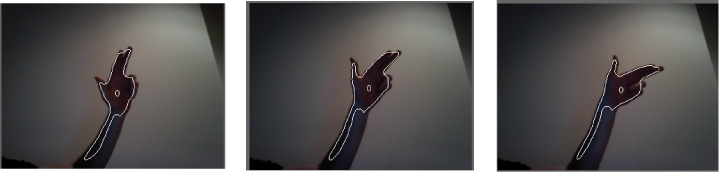
You can make contour detection more robust by comparing the current image to a background image and subtracting the background from the current image. This enables you to examine the incoming image without the background image data, reducing the amount of data that needs to be inspected.
The contourFinder requires an ofxCvGrayscaleImage be passed to it, so you'll need to create one from either a video or camera feed that you're using. An example of working with a camera is shown here.
In your ofApp header file:
#pragma once

#include "ofMain.h"
#include "ofxOpenCv.h"

class ofApp : public ofBaseApp{

	public:
		void setup();
		void update();
		void draw();
		void keyPressed(int key);

		bool bLearnBackground;
		ofVideoGrabber vidGrabber;
		ofxCvColorImage colorImg;
		ofxCvGrayscaleImage grayImage, grayBg, grayDiff;
		ofxCvContourFinder contourFinder;
};
In your ofApp.cpp file:
#include "ofApp.h"

void ofApp::setup(){

    bLearnBackground = false;

    vidGrabber.setVerbose(true);
    vidGrabber.initGrabber(320,240);

    colorImg.allocate(320,240);
    grayImage.allocate(320,240);
    grayBg.allocate(320,240);
    grayDiff.allocate(320,240);
}

void ofApp::update(){
    vidGrabber.update();
    //do we have a new frame?
    if (vidGrabber.isFrameNew()){
        colorImg.setFromPixels(vidGrabber.getPixels());
        grayImage = colorImg; // convert our color image to a grayscale image
        if (bLearnBackground == true) {
            grayBg = grayImage; // update the background image
            bLearnBackground = false;
        }
        grayDiff.absDiff(grayBg, grayImage);
        grayDiff.threshold(30);
        contourFinder.findContours(grayDiff, 5, (340*240)/4, 4, false, true);
    }
}

void ofApp::draw(){
    ofSetHexColor(0xffffff);
    colorImg.draw(0, 0, 320, 240);
    grayDiff.draw(0, 240, 320, 240);
    ofDrawRectangle(320, 0, 320, 240);
    contourFinder.draw(320, 0, 320, 240);
    ofColor c(255, 255, 255);
    for(int i = 0; i < contourFinder.nBlobs; i++) {
        ofRectangle r = contourFinder.blobs.at(i).boundingRect;
        r.x += 320; r.y += 240;
        c.setHsb(i * 64, 255, 255);
        ofSetColor(c);
        ofDrawRectangle(r);
    }
}

void ofApp::keyPressed(int key) {
    bLearnBackground = true;
}
draw( )
void draw()Draws the detected contours at 0, 0.
draw( ... )
void draw(float x, float y)Draws the detected contours into the coordintes passed in.
draw( ... )
void draw(float x, float y, float w, float h)Draws the detected contours at the point passed in with the height and width, scaling as necessary.
draw( ... )
void draw(const ofPoint &point)Draws the detected contours at the point passed in.
draw( ... )
void draw(const ofRectangle &rect)Draws the detected contours into the ofRectangle passed in scaling if necessary.
findContours( ... )
int findContours(ofxCvGrayscaleImage &input, int minArea, int maxArea, int nConsidered, bool bFindHoles, bool bUseApproximation=true)This function tries to find distinct regions (blobs) in the given ofxCvGrayscaleImage. It returns the number of blobs found.
input
This is an ofxCvGrayscaleImage reference (ofxCvGrayscaleImage&) to a grayscale image that will be searched for blobs. Note that grayscale images only are considered. So if you're using a color image, you'll need to highlight the particular color that you're looking for beforehand. You can do this by looping through the pixels and changing the color values of any pixel with the desired color to white or black, for instance.
minArea
This is the smallest potential blob size as measured in pixels that will be considered as a blob for the application.
maxArea
This is the largest potential blob size as measured in pixels that will be considered as a blob for the application.
nConsidered
This is the maximum number of blobs to consider. This is an important parameter to get right, because you can save yourself a lot of processing time and possibly speed up the performance of your application by pruning this number down. An interface that uses a user's fingers, for instance, needs to look only for 5 points, one for each finger. One that uses a user's hands needs to look only for two points.
bFindHoles
This tells the contour finder to try to determine whether there are holes within any blob detected. This is computationally expensive but sometimes necessary.
bUseApproximation
This tells the contour finder to use approximation and to set the minimum number of points needed to represent a certain blob; for instance, a straight line would be represented by only two points if bUseApproximation is set to true.
getHeight( )
float getHeight()Returns the height of the area that detection is being performed upon.
getWidth( )
float getWidth()Returns the height of the area that detection is being performed upon.
ofxCvContourFinder( )
ofxCvContourFinder()Constructor.
reset( )
void reset()resetAnchor( )
void resetAnchor()Resets the anchor point, restoring it to 0,0.
setAnchorPercent( ... )
void setAnchorPercent(float xPct, float yPct)Sets the anchor point as a percentage.
setAnchorPoint( ... )
void setAnchorPoint(int x, int y)Sets an anchor point for the drawing.
~ofxCvContourFinder( )
~ofxCvContourFinder()Destructor.