ofxCvHaarFinder
ofxCvHaarFinder allows you to check an image for a match to a Haar classifier. The Haar Classifier is a data file generated from a training process where an application is "taught" how to recognize something in different contexts. This can be things like recognizing whether a certain sound is a word being spoken by a user, whether a gesture is a certain shape, or, in the image shown below, whether a pattern of pixels constitute a face.
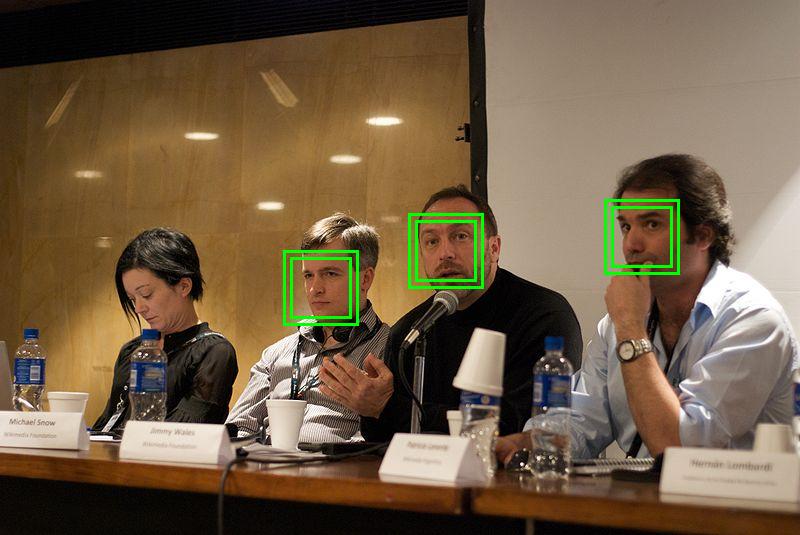
A very basic set-up of an application using ofxCvHaarFinder would look like so:
app::setup() {
   haarFinder.setup("haarcascade.xml"); // must be in /data/
}

app::update() {
   haarFinder.findHaarObjects(imageToExamine);
}

app::draw() {
  for(int i = 0; i < haarFinder.blobs.size(); i++) {
     ofDrawRectangle( haarFinder.blobs[i].boundingRect );
  }
}
draw( ... )
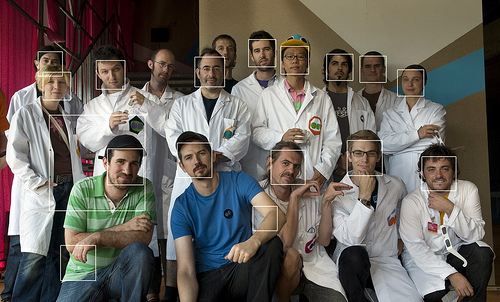
void draw(float x, float y)Draws any detected objects to the screen with a rectangle, like so:
findHaarObjects( ... )
int findHaarObjects(const ofxCvGrayscaleImage &, int x, int y, int w, int h, int minWidth=0, int minHeight=0)Takes an input ofxCvGrayscaleImage object and allows you to set the minimum width and height of areas that should be returned and a region of interest as an ofRectangle that you would like to limit haar finding to.
findHaarObjects( ... )
int findHaarObjects(const ofxCvGrayscaleImage &input, ofRectangle &roi, int minWidth=0, int minHeight=0)Takes an input ofxCvGrayscaleImage object and allows you to set the minimum width and height of areas that should be returned and a region of interest as an ofRectangle that you would like to limit haar finding to.
colorImg.setFromPixels(vidGrabber.getPixels());
grayImage = colorImg; // convert our color image to a grayscale image

faceFinder.findHaarObjects(grayImage);

for(int i = 0; i < faceFinder.blobs.size(); i++) {
	ofRectangle roi = faceFinder.blobs[i].boundingRect;
	eyeFinder.findHaarObjects(grayImage, roi);
}
findHaarObjects( ... )
int findHaarObjects(ofImage &input, int minWidth=0, int minHeight=0)Takes an input ofImage object and allows you to set the minimum width and height of areas that should be returned.
camera.grabFrame();
if(camera.isFrameNew())
{
	img.setFromPixels(grab.getPixels());
	finder.findHaarObjects(img);
}
findHaarObjects( ... )
int findHaarObjects(const ofxCvGrayscaleImage &input, int minWidth=0, int minHeight=0)Takes an input ofxCvGrayscaleImage object and allows you to set the minimum width and height of areas that should be returned.
findHaarObjects( ... )
int findHaarObjects(ofPixels &input, int minWidth=0, int minHeight=0)Takes an input ofPixels object and allows you to set the minimum width and height of areas that should be returned.
getHeight( )
float getHeight()Returns the height of the image area that is being examined.
getWidth( )
float getWidth()Returns the width of the image area that is being examined.
ofxCvHaarFinder( ... )
ofxCvHaarFinder(const ofxCvHaarFinder &finder)Copy constructor.
ofxCvHaarFinder( )
ofxCvHaarFinder()Constructor.
setNeighbors( ... )
void setNeighbors(unsigned int neighbors)Minimum number (minus 1) of neighbor rectangles that makes up an object. All the groups of a smaller number of rectangles than min_neighbors-1 are rejected. If min_neighbors is 0, the function does not any grouping at all and returns all the detected candidate rectangles, that might be useful if you want to do a customized grouping.
setScaleHaar( ... )
void setScaleHaar(float scaleHaar)setup( ... )
void setup(string haarFile)This loads a Haar cascade file into the finder. This needs to be done before the Haar finder can be used with images.
~ofxCvHaarFinder( )
~ofxCvHaarFinder()Destructor.