ofPath
ofPath is a way to create a path or multiple paths consisting of points. It allows you to combine multiple paths consisting of points into a single vector data object that can be drawn to the screen, manipulated point by point, or manipulated with it's child subpaths. It is better at representing and manipulating complex shapes than the ofPolyline and more easily represents multiple child lines or shapes as either ofSubPath or ofPolyline instances. By default ofPath uses ofSubPath instances. Closing the path automatically creates a new path:
for( int i = 0; i < 5; i++) {
    path.arc( i * 50 + 20, i * 50 + 20, i * 40 + 10, i * 40 + 10, 0, 360); // creates a new ofSubPath
    path.close();
}
To use ofPolyline instances, simply set the mode to POLYLINES
path.setMode(ofPath::POLYLINES);
addCommand( ... )
void addCommand(const ofPath::Command &command)append( ... )
void append(const ofPath &path)arc( ... )
void arc(const glm::vec3 ¢re, float radiusX, float radiusY, float angleBegin, float angleEnd)Create an arc at centre, which has the radiusX, radiusY, and begins at angleBegin and ends at angleEnd. To draw a circle with a radius of 50 pixels at 100, 100:
\note angleBegin needs to be larger than angleEnd, i.e. 0,180 is ok, while 180,0 is not.
Creates an arc at centre, which has the radiusX, radiusY, and begins at angleBegin and ends at angleEnd. To draw a circle with a radius of 50 pixels at 100, 100:
path.arc( 100, 100, 50, 50, 0, 360);
Note that angleEnd needs to be larger than angleBegin, i.e. 0, 180 is ok, while 180,0 is not.
arc( ... )
void arc(const glm::vec2 ¢re, float radiusX, float radiusY, float angleBegin, float angleEnd)arc( ... )
void arc(const glm::vec3 ¢re, float radiusX, float radiusY, float angleBegin, float angleEnd, bool clockwise)Creates an arc at centre, which has the radiusX, radiusY, and begins at angleBegin and ends at angleEnd. To draw a circle with a radius of 50 pixels at 100, 100:
path.arc( 100, 100, 50, 50, 0, 360);
Note that angleEnd needs to be larger than angleBegin, i.e. 0, 180 is ok, while 180,0 is not.
arc( ... )
void arc(const glm::vec2 ¢re, float radiusX, float radiusY, float angleBegin, float angleEnd, bool clockwise)arc( ... )
void arc(float x, float y, float radiusX, float radiusY, float angleBegin, float angleEnd)Create an arc at x,y, which has the radiusX, radiusY, and begins at angleBegin and ends at angleEnd. To draws a shape with a radius of 200 pixels at 300, 300:
path.moveTo(300, 300);
path.arc( 300, 300, 200, 200, 0, 271); // note 271, not 270 for precision

\note angleBegin needs to be larger than angleEnd, i.e. 0, 180 is ok, while 180,0 is not.
Creates an arc at x,y, which has the radiusX, radiusY, and begins at angleBegin and ends at angleEnd. To draws a shape with a radius of 200 pixels at 300, 300:
path.moveTo(300, 300);
path.arc( 300, 300, 200, 200, 0, 271); // note 271, not 270 for precision

Note that angleEnd needs to be larger than angleBegin, i.e. 0, 180 is ok, while 180,0 is not.
arc( ... )
void arc(float x, float y, float z, float radiusX, float radiusY, float angleBegin, float angleEnd)Create an arc at x,y,z, which has the radiusX, radiusY, and begins at angleBegin and ends at angleEnd.
Creates an arc at x,y,z, which has the radiusX, radiusY, and begins at angleBegin and ends at angleEnd.
arcNegative( ... )
void arcNegative(const glm::vec3 ¢re, float radiusX, float radiusY, float angleBegin, float angleEnd)arcNegative( ... )
void arcNegative(const glm::vec2 ¢re, float radiusX, float radiusY, float angleBegin, float angleEnd)arcNegative( ... )
void arcNegative(float x, float y, float radiusX, float radiusY, float angleBegin, float angleEnd)arcNegative( ... )
void arcNegative(float x, float y, float z, float radiusX, float radiusY, float angleBegin, float angleEnd)bezierTo( ... )
void bezierTo(const glm::vec3 &cp1, const glm::vec3 &cp2, const glm::vec3 &p)Create a cubic bezier line from the current drawing point with the 2
control points indicated by glm::vec3 cp1 and cp2, that ends at glm::vec3
to.
line.addVertex(glm::vec3(200, 400));
line.bezierTo(100, 100, 800, 100, 700, 400);
 The control points are shown in red.
Create a cubic bezier line from the current drawing point with the two control points indicated by ofPoint cp1 and ofPoint cp2, that ends at ofPoint p.
path.moveto(ofPoint(200, 400));
path.bezierTo(100, 100, 800, 100, 700, 400);
Creates this:
 The control points are shown in yellow.
bezierTo( ... )
void bezierTo(const glm::vec2 &cp1, const glm::vec2 &cp2, const glm::vec2 &p)Create a cubic bezier line from the current drawing point with the two control points indicated by ofPoint cp1 and ofPoint cp2, that ends at ofPoint p.
path.moveto(ofPoint(200, 400));
path.bezierTo(100, 100, 800, 100, 700, 400);
Creates this:
The control points are shown in yellow.
bezierTo( ... )
void bezierTo(float cx1, float cy1, float cx2, float cy2, float x, float y)Create a cubic bezier line from the current drawing point with the 2 control points indicated by the coordinates cx1, cy1 and cx2, cy2, that ends at the coordinates x, y.
Create a cubic bezier line from the current drawing point with the two control points indicated by the coordinates (cx1, cy1) and (cx2, cy2), that ends at the coordinate (x, y).
bezierTo( ... )
void bezierTo(float cx1, float cy1, float cz1, float cx2, float cy2, float cz2, float x, float y, float z)Create a cubic bezier line in 3D space from the current drawing point with the 2 control points indicated by the coordinates cx1, cy1, cz1 and cx2, cy2, cz2, that ends at the coordinates x, y, z.
Create a cubic bezier line in 3D space from the current drawing point with the two control points indicated by the coordinates (cx1, cy1, cz1) and (cx2, cy2, cz2), that ends at the coordinate (x, y, z).
float cx = ofGetWidth()/2;
float cy = 200;
float step = TWO_PI / 60;
for (float i = 0.0; i < TWO_PI; i+=step) {

    if(i == 0.0) {
        path.moveTo(cx + (400*cos(i)), cy+400, 400 * sin(i));
    } else {
        path.bezierTo( cx - (200*cos(i)), cy-100, 400 * sin(i),
                       cx + (200*cos(i)), cy+600, 400 * sin(i),
                       cx + (400*cos(i)), cy+400, 400 * sin(i));
    }
}
circle( ... )
void circle(const glm::vec3 &p, float radius)circle( ... )
void circle(const glm::vec2 &p, float radius)circle( ... )
void circle(float x, float y, float radius)circle( ... )
void circle(float x, float y, float z, float radius)clear( )
void clear()Remove all subpaths from the ofPath instance
Removes all subpaths from the ofPath instance.
close( )
void close()Close the current subpath and create a new subpath, either an ofPolyline or ofSubPath by calling newSubPath(), ensuring that the closed path doesn't have new points added to it.
Closes the current subpath and creates a new subpath, either an ofPolyline or ofSubPath by calling newSubPath(), ensuring that the closed path doesn't have new points added to it.
curveTo( ... )
void curveTo(const glm::vec3 &p)Draws a curve to p from the current drawing position
Draws a curve to p from the current drawing position.
curveTo( ... )
void curveTo(const glm::vec2 &p)Draws a curve to p from the current drawing position.
curveTo( ... )
void curveTo(float x, float y)Draws a curve to x,y from the current drawing position
Draws a curve to x,y from the current drawing position. To draw a small rose curves at the mouse position:
float scale = ofDist(mouseX, mouseY, px, py);

for( float theta = 0; theta < TWO_PI; theta += 0.1)
{
    float r =  cos(theta * (scale/6)) * scale;
    path.curveTo(mouseX + r * cos(theta), mouseY + r * sin(theta));
}

px = mouseX;
py = mouseY;
curveTo( ... )
void curveTo(float x, float y, float z)Draws a curve to x,y,z from the current drawing position
Draws a curve to x,y,z from the current drawing position.
draw( )
void draw()Draws the path at 0,0. Calling draw() also calls tessellate()
Draws the path at 0,0. Calling draw() also calls tessellate().
draw( ... )
void draw(float x, float y)Draws the path at x,y. Calling draw() also calls tessellate()
Draws the path at x,y. Calling draw() also calls tessellate().
ellipse( ... )
void ellipse(const glm::vec3 &p, float width, float height)ellipse( ... )
void ellipse(const glm::vec2 &p, float width, float height)ellipse( ... )
void ellipse(float x, float y, float width, float height)ellipse( ... )
void ellipse(float x, float y, float z, float width, float height)flagShapeChanged( )
void flagShapeChanged()generatePolylinesFromCommands( )
void generatePolylinesFromCommands()getCircleResolution( )
int getCircleResolution()getCommands( )
int & getCommands()getCommands( )
const int & getCommands()getCurveResolution( )
int getCurveResolution()getFillColor( )
ofColor getFillColor()Get the ofColor fill of the ofPath
Returns the ofColor that the ofPath is using.
getMode( )
ofPath::Mode getMode()getOutline( )
const int & getOutline()Get an ofPolyline representing the outline of the ofPath.
This returns an ofPolyline representing the outline of an ofPath.
getStrokeColor( )
ofColor getStrokeColor()Get the stroke color of the ofPath
Returns the stroke color that the ofPath is using.
getStrokeWidth( )
float getStrokeWidth()Get the stroke width of the ofPath
The default value is `0
Returns the stroke width.
getTessellation( )
const ofMesh & getTessellation()getUseShapeColor( )
bool getUseShapeColor()getWindingMode( )
ofPolyWindingMode getWindingMode()Get the poly winding mode currently in use.
Returns the poly winding mode currently in use.
hasChanged( )
bool hasChanged()hasOutline( )
bool hasOutline()isFilled( )
bool isFilled()Get whether the path is using a fill or not.
The default value is true
Whether the path is using a fill or not.
lastPolyline( )
ofPolyline & lastPolyline()}
lineTo( ... )
void lineTo(const glm::vec3 &p)Draw a straight line from the current drawing position to the location indicated by p.
Draws a straight line from the current drawing position to the location indicated by p.
lineTo( ... )
void lineTo(const glm::vec2 &p)Draws a straight line from the current drawing position to the location indicated by p.
lineTo( ... )
void lineTo(float x, float y)Draw a straight line from the current drawing position to the location indicated by x,y.
Draws a straight line from the current drawing position to the location indicated by x,y.
lineTo( ... )
void lineTo(float x, float y, float z)Draw a straight line from the current drawing position to the location indicated by x,y,z.
Draws a straight line from the current drawing position to the location indicated by x,y,z.
moveTo( ... )
void moveTo(const glm::vec3 &p)Move the drawing position to p. This means that a subsequent calls to, for instance, lineTo() or curveTo() will connect the location p to the new location.
Moves the drawing position to p. This means that a subsequent calls to, for instance, lineTo() or curveTo() will connect the location p to the new location.
moveTo( ... )
void moveTo(const glm::vec2 &p)Moves the drawing position to p. This means that a subsequent calls to, for instance, lineTo() or curveTo() will connect the location p to the new location.
moveTo( ... )
void moveTo(float x, float y, float z)Move the drawing position to x,y.z. This means that a subsequent calls to, for instance, lineTo() or curveTo() will connect the location x,y,z to the new location.
Moves the drawing position to x,y.z. This means that a subsequent calls to, for instance, lineTo() or curveTo() will connect the location x,y,z to the new location.
newSubPath( )
void newSubPath()Create a new subpath, either an ofPolyline instance or an ofSubPath instance. All points added after a call to ofSubPath will be done in the newly created subpath. Calling close() automatically calls create newSubPath(), ensuring that the closed path doesn't have new points added to it.
Creates a new subpath, either an ofPolyline instance or an ofSubPath instance. All points added after a call to ofSubPath will be done in the newly created subpath. Calling close() automatically calls create newSubPath(), ensuring that the closed path doesn't have new points added to it.
ofPath( )
ofPath()Create a new ofPath instance.
Creates a new ofPath instance.
quadBezierTo( ... )
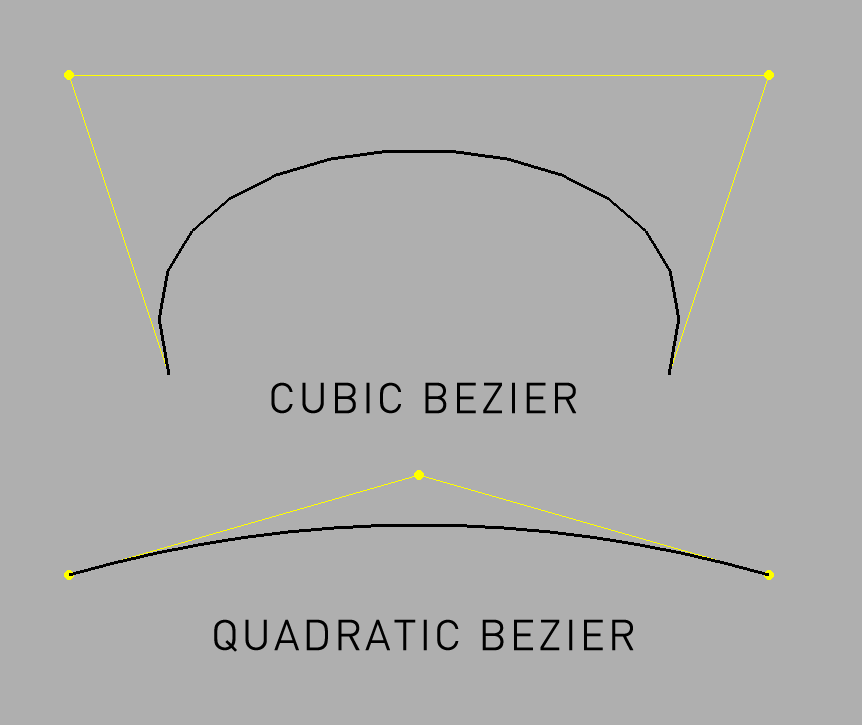
void quadBezierTo(const glm::vec3 &cp1, const glm::vec3 &cp2, const glm::vec3 &p)Create a quadratic bezier line in 3D space from the current drawing
point with the beginning indicated by the coordinates cx1, cy1, cz1,
the control point at cx2, cy2, cz2, and that ends at the coordinates
x, y, z.

Create a quadratic bezier line in 3D space from the current drawing point with the control points indicated by ofPoint cp1 and ofPoint cp2, and that ends at ofPoint p.
quadBezierTo( ... )
void quadBezierTo(const glm::vec2 &cp1, const glm::vec2 &cp2, const glm::vec2 &p)Create a quadratic bezier line in 3D space from the current drawing point with the control points indicated by ofPoint cp1 and ofPoint cp2, and that ends at ofPoint p.
quadBezierTo( ... )
void quadBezierTo(float cx1, float cy1, float cx2, float cy2, float x, float y)Creates a quadratic bezier line in 2D space from the current drawing point with the beginning indicated by the point p1, the control point at p2, and that ends at the point p3.
Creates a quadratic bezier line in 2D space from the current drawing point with the control points indicated by the coordinates (cx1, cy1) and (cx2, cy2), and that ends at the coordinate (x, y)
quadBezierTo( ... )
void quadBezierTo(float cx1, float cy1, float cz1, float cx2, float cy2, float cz2, float x, float y, float z)Creates a quadratic bezier line in 3D space from the current drawing point with the beginning indicated by the coordinates cx1, cy1, the control point at cx2, cy2, and that ends at the coordinates x, y.
Creates a quadratic bezier line in 3D space from the current drawing point with the control points indicated by the coordinates (cx1, cy1, cz1) and (cx2, cy2, cz2), and that ends at the coordinate (x, y, z).
rectRounded( ... )
void rectRounded(const ofRectangle &b, float r)rectRounded( ... )
void rectRounded(const ofRectangle &b, float topLeftRadius, float topRightRadius, float bottomRightRadius, float bottomLeftRadius)rectRounded( ... )
void rectRounded(const glm::vec3 &p, float w, float h, float r)rectRounded( ... )
void rectRounded(const glm::vec2 &p, float w, float h, float r)rectRounded( ... )
void rectRounded(const glm::vec3 &p, float w, float h, float topLeftRadius, float topRightRadius, float bottomRightRadius, float bottomLeftRadius)rectRounded( ... )
void rectRounded(const glm::vec2 &p, float w, float h, float topLeftRadius, float topRightRadius, float bottomRightRadius, float bottomLeftRadius)rectRounded( ... )
void rectRounded(float x, float y, float w, float h, float r)rectRounded( ... )
void rectRounded(float x, float y, float z, float w, float h, float topLeftRadius, float topRightRadius, float bottomRightRadius, float bottomLeftRadius)rectangle( ... )
void rectangle(const glm::vec3 &p, float w, float h)rectangle( ... )
void rectangle(const glm::vec2 &p, float w, float h)rectangle( ... )
void rectangle(const ofRectangle &r)rectangle( ... )
void rectangle(float x, float y, float w, float h)rectangle( ... )
void rectangle(float x, float y, float z, float w, float h)rotateDeg( ... )
void rotateDeg(float degrees, const glm::vec3 &axis)rotateDeg( ... )
void rotateDeg(float degrees, const glm::vec2 &axis)rotateRad( ... )
void rotateRad(float radians, const glm::vec3 &axis)rotateRad( ... )
void rotateRad(float radians, const glm::vec2 &axis)scale( ... )
void scale(float x, float y)Change the size of either the ofPolyline or ofSubPath instances that the ofPath contains. These changes are non-reversible, so for instance scaling by 0,0 zeros out all data.
Changes the size of either the ofPolyline or ofSubPath instances that the ofPath contains. These changes are non-reversible, so for instance scaling by 0,0 zeroes out all data.
setCircleResolution( ... )
void setCircleResolution(int circleResolution)setColor( ... )
void setColor(const ofColor &color)Set the color of the path. This affects both the line if the path is drawn as wireframe and the fill if the path is drawn with fill. All subpaths are affected.
This sets the color of the path. This affects both the line if the path is drawn as wireframe and the fill if the path is drawn with fill. All subpaths are affected.
setCurveResolution( ... )
void setCurveResolution(int curveResolution)setFillColor( ... )
void setFillColor(const ofColor &color)Set the fill color of the path. This has no affect if the path is drawn as wireframe.
This sets the fill color of the path. This has no affect if the path is drawn as wireframe.
setFillHexColor( ... )
void setFillHexColor(int hex)Set the fill color of the path. This has no affect if the path is drawn as wireframe.
This sets the fill color of the path. This has no affect if the path is drawn as wireframe.
setFilled( ... )
void setFilled(bool hasFill)Set whether the path should be drawn as wireframes or filled.
Sets whether the path should be drawn as wireframes or filled.
setHexColor( ... )
void setHexColor(int hex)Set the color of the path. This affects both the line if the path is drawn as wireframe and the fill if the path is drawn with fill. All subpaths are affected.
This sets the color of the path. This affects both the line if the path is drawn as wireframe and the fill if the path is drawn with fill. All subpaths are affected.
setMode( ... )
void setMode(ofPath::Mode mode)setPolyWindingMode( ... )
void setPolyWindingMode(ofPolyWindingMode mode)Set the way that the points in the sub paths are connected.
OpenGL can only render convex polygons which means that any shape that isn't convex, i.e. that has points which are concave, going inwards, need to be tessellated into triangles so that OpenGL can render them. If you're using filled shapes with your ofPath this is done automatically for you.
The possible options you can pass in are:
OF_POLY_WINDING_ODD
OF_POLY_WINDING_NONZERO
OF_POLY_WINDING_POSITIVE
OF_POLY_WINDING_NEGATIVE
OF_POLY_WINDING_ABS_GEQ_TWO
This sets the way that the points in the sub paths are connected. OpenGL can only render convex polygons which means that any shape that isn't convex, i.e. that has points which are concave, going inwards, need to be tessellated into triangles so that OpenGL can render them. If you're using filled shapes with your ofPath this is done automatically for you. The possible options you can pass in are:
OF_POLY_WINDING_ODD OF_POLY_WINDING_NONZERO OF_POLY_WINDING_POSITIVE OF_POLY_WINDING_NEGATIVE OF_POLY_WINDING_ABS_GEQ_TWO
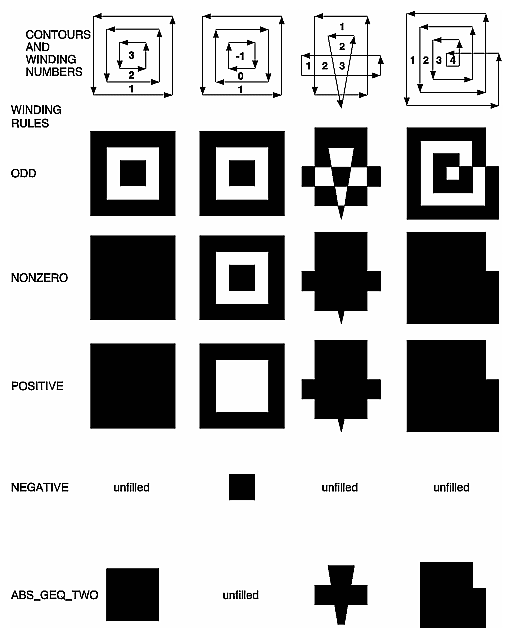
So adding the following points:
void ofApp::setup(){

    path.lineTo(0, 400);
    path.lineTo(400, 400);
    path.lineTo(400, 0);
    path.lineTo(0, 0); // outer
    path.close();
    path.moveTo(100, 100);
    path.lineTo(100, 300);
    path.lineTo(300, 300);
    path.lineTo(300, 100);
    path.lineTo(100, 100); // inner 1
    path.close();
    path.moveTo(250, 150);
    path.lineTo(150, 150);
    path.lineTo(150, 250);
    path.lineTo(250, 250);
    path.lineTo(250, 150); // inner 2 (backwards)

    path2.lineTo(0, 400);
    path2.lineTo(400, 400);
    path2.lineTo(400, 0);
    path2.lineTo(0, 0); // outer
    path2.close();
    path2.moveTo(100, 100);
    path2.lineTo(300, 100);
    path2.lineTo(300, 300);
    path2.lineTo(100, 300);
    path2.lineTo(100, 100); // inner 1
    path2.close();
    path2.moveTo(150, 150);
    path2.lineTo(250, 150);
    path2.lineTo(250, 250);
    path2.lineTo(150, 250);
    path2.lineTo(150, 150); // inner 2 (fwds)

}

void ofApp::draw(){

    ofTranslate(40,40);
    path.draw();
    ofTranslate(410, 0);
    path2.draw();

}

void ofApp::keyPressed(int key){

    mode++;
    if( mode
setStrokeColor( ... )
void setStrokeColor(const ofColor &color)Set the stroke color of the path. This has no affect if the path is drawn filled.
This sets the stroke color of the path. This has no affect if the path is drawn filled.
setStrokeHexColor( ... )
void setStrokeHexColor(int hex)Set the stroke color of the path. This has no affect if the path is drawn filled.
This sets the stroke color of the path. This has no affect if the path is drawn filled.
setStrokeWidth( ... )
void setStrokeWidth(float width)Set the stroke width of the line if the ofPath is to be drawn not in wireframe.
Sets the stroke width of the line if the ofPath is to be drawn not in wireframe.
setUseShapeColor( ... )
void setUseShapeColor(bool useColor)simplify( ... )
void simplify(float tolerance=0.3f)tessellate( )
void tessellate()translate( ... )
void translate(const glm::vec3 &p)translate( ... )
void translate(const glm::vec2 &p)triangle( ... )
void triangle(const glm::vec3 &p1, const glm::vec3 &p2, const glm::vec3 &p3)triangle( ... )
void triangle(const glm::vec2 &p1, const glm::vec2 &p2, const glm::vec2 &p3)triangle( ... )
void triangle(float x1, float y1, float x2, float y2, float x3, float y3)triangle( ... )
void triangle(float x1, float y1, float z1, float x2, float y2, float z2, float x3, float y3, float z3)